Computer upgrades and speed-ups in Leeds
A slow computer is not the same thing as a dying computer, and it is usually one specific part holding the whole machine back. We find out which, and then tell you plainly whether an upgrade is worth the money or whether you would be better keeping it towards a new machine. We would rather lose a small job than sell you parts that will not change how it feels.
- No fix, no fee on the repairIf we cannot fix it, you do not pay for the repair. In writing, on every job.
- Free advice by messageDescribe the fault and we will tell you what it sounds like and whether it is worth doing, before anyone travels.
- We come to youAcross Leeds, West Yorkshire and North Yorkshire, or we collect and return.
- A real person repliesNot a call centre, not a ticket queue: we read every enquiry, day and night, Sunday to Friday. The fixed quote you agree is the price you pay.
Does this sound like yours?
The faults we see most
- It takes minutes to reach the desktop, and minutes more before you can actually click anything
- The spinning circle turns up at everything, even opening a folder
- The drive light sits on solid while you wait, and you can hear it working away
- It was fine when you got it and it has been getting slower every year since
- A few browser tabs and a spreadsheet at the same time and it stops responding
- The not responding banner appears and you sit there hoping it comes back on its own
- The fans wind up hard just from scrolling a web page
- It says the disk is full, you have deleted everything you can bear to lose, and it is still full
- It came loaded with software you never asked for, and a lot of it starts itself with the machine
- It keeps telling you it cannot run Windows 11
- Somebody has told you to buy a new one and you would rather not spend that
Not on the list? Send an enquiry anyway and describe it. Describing it to us in a message is free either way.
What we do
Name the fault, then the fix, then the price
-
Tell us in your message what the machine is, roughly how old it is, and what you actually use it for, because the answer for someone running a browser and email is not the answer for someone editing video
-
We come to you across Leeds, at home or at work. There is no sense unplugging a whole desk and carrying an expensive machine across town to be told what is slowing it down
-
We measure the bottleneck instead of guessing at it. What the drive really is and whether it is healthy, how much memory the machine has and whether it is running out, what is loading itself at startup, and whether it is overheating and throttling itself
-
If there is still a spinning hard disk inside, that is nearly always the whole story, and moving it to an SSD is the single change most people feel the most. We clone your existing setup across where we can, so it comes back as your machine, with everything where you left it, only quick
-
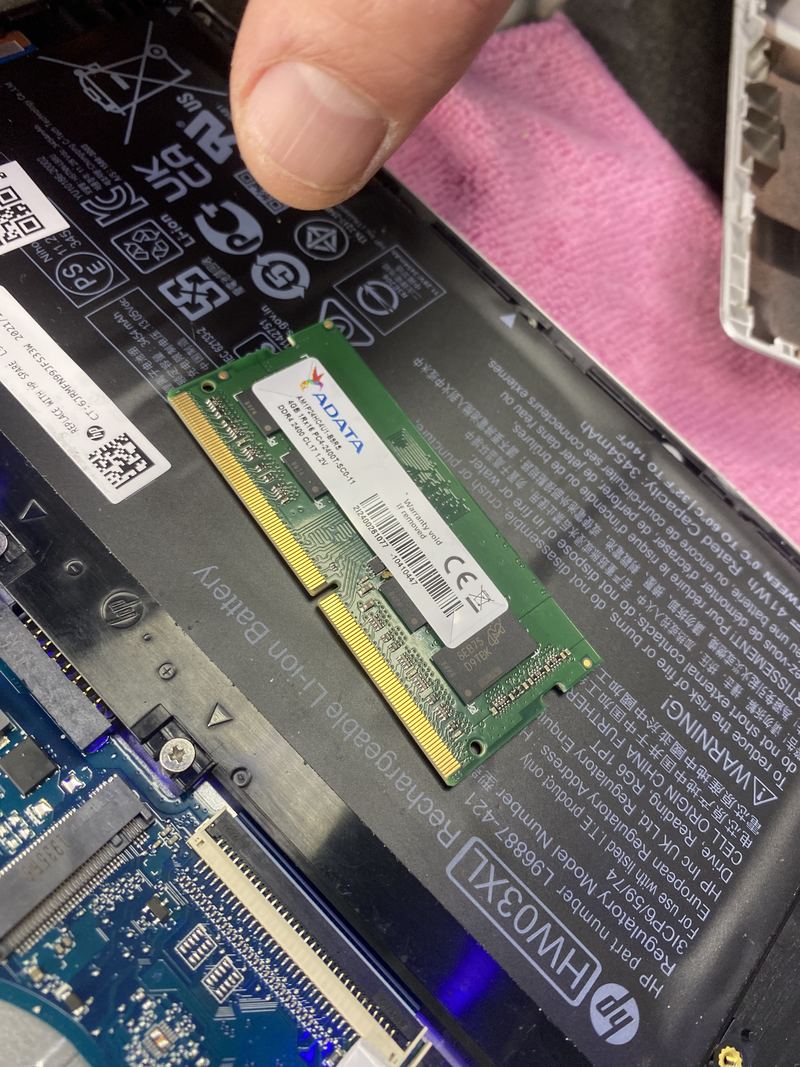
Memory: we check what your board will genuinely take, how many slots there are, and whether they are already filled. On plenty of thin laptops the memory is soldered down and cannot be added to at any price, and we will tell you that instead of taking the work
-
Bloatware and startup clutter: we strip out what the manufacturer left on there and what has piled up since, and we cut down what launches with the machine. We do not install a PC optimiser or sell you a subscription to one
-
A clean install, where the Windows install has been through years of software and picking at it will not save it. Your files and your setup are backed up first and carried across afterwards
-
Heat, which is the upgrade people never think of. A machine that is choking on dust deliberately slows itself down to stay safe, and a proper clean with fresh thermal paste can cost less than parts and do more
-
Then a straight recommendation: what to change, what not to bother with, and whether the honest answer is to spend nothing here and put the money towards a new machine. One fixed quote before any work starts
How long it takes
An honest answer, not a booking slot
The check itself is usually done while we are with you. A drive or a memory upgrade to a desktop is often finished in the same visit, since the case opens in seconds. Laptops vary a great deal: some have a hatch on the underside and take minutes, and others have to come almost completely apart to reach the drive, which is time. The part that takes the longest is rarely the part that gets fitted. Cloning your setup across to a new SSD takes as long as your data takes to copy, and a clean install is slower still, because putting your files and programs back is not work worth rushing. Where a drive or memory has to be ordered in for your exact model, that is usually a few days. We will tell you which of these yours is when we quote, so you can plan around it.
What it costs
Free advice by message, a call-out quoted first, then a fixed price
Telling us the fault in a message costs nothing, and it is worth doing first: some faults we can sort over a remote link without anybody travelling. If it needs a visit there is a minimum call-out, quoted before we travel, and it comes off the price if you go ahead. We do not publish a price list beyond that, because a price list for this work would be a fiction: the same fault costs different money on different machines. What we can do is tell you what moves the number, then give you one fixed quote before any work starts. If we cannot fix the fault we quoted for, there is no repair fee.
What drives the price
- Which parts you genuinely need, which is often fewer than people expect and occasionally none at all
- The size of drive you want, since capacity is most of what you are paying for
- The kind of drive your machine takes, because an older laptop expecting a flat 2.5 inch drive and a newer board expecting an NVMe stick are not the same part or the same money
- How much memory, what type your board takes, and whether it accepts standard sticks or was built with the memory soldered on
- How the machine is built, because a tower is open in seconds while some laptops have to be almost entirely stripped to reach the drive underneath
- Whether you want your existing setup cloned across as it is, or a clean install with your files carried over, since those are two different amounts of work
- How much data has to move, and whether the old drive is healthy enough to copy from at full speed or has to be coaxed
- Whether the machine also needs the dust and thermal paste dealing with while it is open, which is often the cheapest speed you will buy
Where we work
We come to you across Leeds, West Yorkshire and North Yorkshire
Home or work, day or night, Sunday to Friday. There is no walk-in shop, so we come to the machine, or collect it and bring it back. Start at computer repair in Leeds, or pick your area.
Questions
The things people ask
Will an SSD actually make my old computer faster?
If your machine still has a spinning hard disk in it, then yes, and it is the biggest difference most people ever feel from a single part. Almost all of that waiting, the slow start-up, the spinning circle, the drive grinding away while nothing happens, is the machine sitting there waiting on that disk. If you already have an SSD, then adding another one will not fix anything, because the drive is not what is holding you back, and we will go looking for what is instead. That is exactly the sort of thing we would rather find out before quoting than have you pay to discover.
Will more memory fix it?
Only if you are actually running out of it. Memory helps when the machine has more open than it can hold and starts shuffling things back and forth to the drive, which is what it feels like when a handful of browser tabs and a spreadsheet bring everything to a stop. If your computer is sitting there with plenty of memory spare and still crawling, more sticks will change nothing, and we will say so rather than sell them to you. It is worth knowing too that on a lot of slim laptops the memory is soldered to the board, so it cannot be added to later by anyone.
Is it worth upgrading, or should I just buy a new one?
That is the real question, and we will give you a straight answer. Advice by message is free either way. If the machine is fundamentally sound and it is only the drive or the memory holding it back, an upgrade costs a fraction of a new computer and you keep everything set up the way you like it. There is a point where it stops making sense, and we will tell you when you have reached it: a processor that was never going to be quick, a board that is already failing, a laptop where the hinge and the battery are going as well. Spending good money on that machine is not a favour to you.
Will I lose my files and my programs?
No, and keeping everything exactly as you had it is normally the whole point. When we move you to a new drive we clone what is already there, so you switch on afterwards and it is still your machine, with your files, your programs and your desktop where you left them, just far quicker. Where a clean install genuinely is the better answer, we back your files up first and carry them across afterwards, and we tell you before we start rather than once it is underway.
Should I buy one of those PC cleaner or speed booster programs?
No. We will not install one and we will not sell you one. Most of them charge a subscription for tidying that the machine already does by itself, several make things worse by loading yet more into the background, and a few are the reason the computer got slow in the first place. Real speed comes from the drive, the memory, what you have got starting with the machine, and whether it is cool enough to run properly. There is no program you can buy that stands in for those.
My computer says it cannot run Windows 11. What are my options?
Worth checking properly, because there are two different situations here and they look the same from where you are sitting. Sometimes the machine is perfectly capable and the requirements are simply switched off in its firmware, and turning them back on costs nothing. Sometimes the hardware genuinely does not meet what Microsoft asks for, and in that case no amount of memory or new drives will change the answer. Windows 10 no longer gets Microsoft's standard security updates, so it does matter. We will tell you which of the two you are in, and if it is the second one, we will talk about what makes sense rather than sell you an upgrade that does not solve it.
Is your work guaranteed after the repair?
Yes. We stand behind the repairs we carry out. If the same fault we fixed returns as a result of our work, get in touch and we will put it right at no charge. Inside 90 days we do that without argument. Past 90 days we will still look at it on its merits, because a reasonable period for a fitted screen and a reasonable period for a fifteen-year-old desktop are not the same thing. This sits on top of your statutory rights, not instead of them, and those last longer. It does not cover new or unrelated faults, accidental damage, liquid damage, or problems caused by other work carried out after ours.
Worth reading first
A plain-English guide before you spend anything
Related repairs
You might also need
PC and desktop repair
Dead tower, black screen, random restarts, roaring fans, or Windows that will not start? Free advice by message, a call-out quoted first, no fix no fee on the repair.
Laptop repair
Dead, crashing, overheating, or refusing to charge? We find the real fault and quote you a fixed price before anything is opened.
Gaming PC repair & builds
Will not post, overheating, crashing under load, or a GPU acting up? We find the real fault, and we build honest custom machines to a brief.
Data recovery
Deleted files, a failing drive, or a laptop that will not start. We tell you what can honestly be recovered before you spend anything, and what cannot.
Tell us what is wrong.
Send an enquiry and describe the fault. We will find the fault properly, give you a fixed quote before any work, and if we cannot fix it there is nothing to pay for the repair. A real person who does the work, not a call centre.