Mac repair in Leeds
Macs are worth repairing, and they are also the machines people are most nervous about handing over. So we will tell you the model, the year, and the honest truth about what can be done to it, before any work starts. Tell us what yours is doing. Advice by message is free, the quote is fixed and comes before any work, and if we cannot fix it there is nothing to pay for the repair.
- No fix, no fee on the repairIf we cannot fix it, you do not pay for the repair. In writing, on every job.
- Free advice by messageDescribe the fault and we will tell you what it sounds like and whether it is worth doing, before anyone travels.
- We come to youAcross Leeds, West Yorkshire and North Yorkshire, or we collect and return.
- A real person repliesNot a call centre, not a ticket queue: we read every enquiry, day and night, Sunday to Friday. The fixed quote you agree is the price you pay.
Does this sound like yours?
The faults we see most
- You press the power button and get nothing at all: no fan, no light, no sound
- It reaches the Apple logo and stops, or the progress bar fills part of the way and stalls there
- A folder with a question mark flashes on the screen instead of starting up
- It restarts on its own and then tells you it restarted because of a problem
- The colourful spinning wheel, the beachball, turns up at everything and the Mac crawls
- The battery says Service Recommended, or it charges to full and then drops dead in an hour
- The MacBook no longer sits flat on the desk, or the trackpad has gone stiff and will not click
- Keys stick, repeat themselves, or have stopped responding altogether
- It says the startup disk is full and you cannot see where the space has gone
- A macOS update failed part way and now it will not finish, or it will not get past the login screen
- The iMac powers up but the screen stays black, or it has lines or dark patches across it
Not on the list? Send an enquiry anyway and describe it. Describing it to us in a message is free either way.
What we do
Name the fault, then the fix, then the price
-
You tell us in your message what it is doing, and roughly which Mac it is and when you bought it. That matters more on a Mac than on anything else, because what is repairable changes sharply from one model year to the next
-
We come to you across Leeds. Nobody wants to unplug a whole desk, put a large iMac in the back of a car, and drive an expensive machine across town to be told what is wrong with it. We can collect it and bring it back if that is easier
-
A Mac that will not start: we separate a dead machine from a broken system, because they look identical from the outside and they are not the same job at all. A flashing question mark, for example, means the Mac cannot find a system to start from, and the machine itself is very often perfectly fine
-
Restarts and panics: we read the reports the Mac has already written about why it fell over, rather than reinstalling macOS and hoping the fault leaves with it
-
The beachball: we measure it instead of guessing. Free space, memory pressure, the process that is actually stalling, and the true health of the drive. On an older iMac still running a hard disk or a Fusion Drive, the drive is very often the whole story
-
Storage: where the drive in your Mac can still be changed, moving it to an SSD is the single biggest difference you will ever feel. Where the storage is soldered to the board, it cannot be upgraded at any price, and we will tell you that plainly rather than sell you something else
-
Batteries: we identify the exact battery for your model. They are bonded in place and have to come out carefully. A swollen one comes out promptly, because it is a fire risk and it is what is lifting your trackpad and rocking the machine
-
Keyboards: we tell you honestly whether yours is a key, a keyboard, or a whole top case, because on a lot of MacBooks the keyboard is riveted in and the price follows that, not the number of dead keys
-
macOS itself: your files come first, then we repair the system, and we only reinstall if reinstalling is genuinely the answer rather than the quickest thing to reach for
-
Then one fixed quote, before anything is opened. If it cannot be saved, or the money would be better spent elsewhere, you will hear that from us plainly
How long it takes
An honest answer, not a booking slot
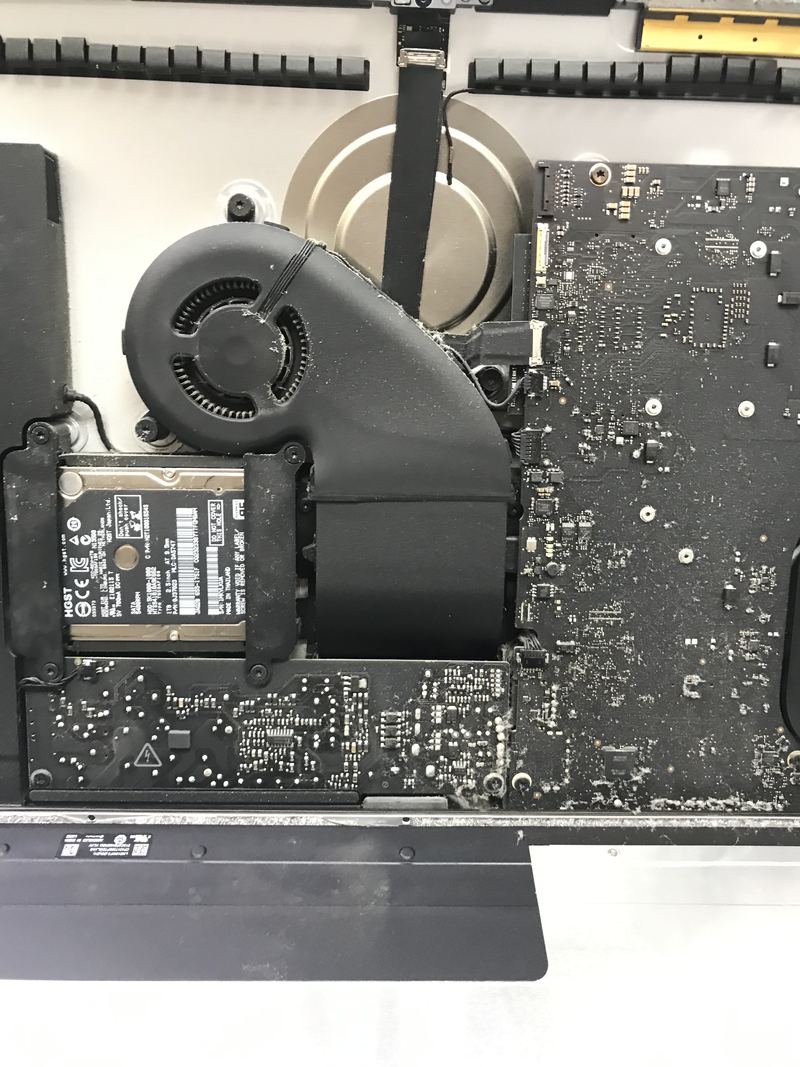
Software faults are the quick ones. Beachballing, a full startup disk, a failed update, a system that will not log in: those are frequently sorted while we are with you. A battery, or a drive on a Mac that still allows one to be changed, is usually same day or next day once the correct part is in hand, and Mac parts are model-specific, so getting the right one can take a few days. Two jobs take real time and we will say so before you agree to anything. A top case, where the keyboard, the battery and the trackpad come as one assembly, is a long job. An iMac is a longer one again, because the screen is glued on and has to be cut away and then re-sealed with fresh adhesive, so it usually comes with us rather than being finished at your table. Liquid damage we will not put a clock on at all.
What it costs
Free advice by message, a call-out quoted first, then a fixed price
Telling us the fault in a message costs nothing, and it is worth doing first: some faults we can sort over a remote link without anybody travelling. If it needs a visit there is a minimum call-out, quoted before we travel, and it comes off the price if you go ahead. We do not publish a price list beyond that, because a price list for this work would be a fiction: the same fault costs different money on different machines. What we can do is tell you what moves the number, then give you one fixed quote before any work starts. If we cannot fix the fault we quoted for, there is no repair fee.
What drives the price
- Whether the fault is in software, which costs time, or in hardware, which costs time and a part
- The exact model and year, because two Macs that look the same from the outside can be built completely differently inside, and that decides what is even possible
- The part itself, since Mac parts are made for that model rather than bought off a shelf
- Whether the failed part comes out on its own or is bonded, riveted, or soldered into something larger, which is why a single dead key can turn into a top case
- Whether it is an iMac, since anything behind the screen means cutting the display off and re-sealing it afterwards, and that is time on every job
- How long it has been left, for example a battery already swelling or a drive that has been struggling for months
- Whether files need pulling off before it is safe to work, and how much there is
- Whether Apple should be doing it instead. If your Mac is still inside its warranty or AppleCare, or falls under a service programme Apple is running, the cheapest outcome is that you do not pay us anything, and we will tell you so
Where we work
We come to you across Leeds, West Yorkshire and North Yorkshire
Home or work, day or night, Sunday to Friday. There is no walk-in shop, so we come to the machine, or collect it and bring it back. Start at computer repair in Leeds, or pick your area.
Questions
The things people ask
The spinning beachball will not go away. Is my Mac finished?
Almost never. The beachball is not a fault in itself, it is macOS telling you it is waiting on something, and the job is to find out what. The usual culprits are a startup disk with almost no free space left, a drive that is beginning to fail, or a Mac being asked to hold more open at once than its memory can carry. On an older iMac with a hard disk or a Fusion Drive inside, it is very often the drive, and moving that Mac to an SSD transforms it. We check which of those it actually is, so you are not paying to have parts thrown at a guess.
My MacBook will not start up. Is the logic board dead?
That is the first thing people fear and rarely the answer. A Mac that will not boot is more often a charger or a battery that will no longer pass power, a system that has been damaged by an interrupted update, or a startup disk the Mac can no longer see. The symptom is a good clue: a flashing question mark folder means it cannot find a system to start from, and that machine is usually healthy underneath. We do not condemn a board until we have proved it, and we show you the proof before we quote for anything.
Can you put a bigger drive or more memory in my Mac?
It depends entirely on which Mac you have, and this is where an honest answer saves you money. On older Macs the storage and sometimes the memory can be changed, and swapping a tired hard disk for an SSD is the best money you can spend on the machine. On recent Macs both are soldered to the board and cannot be upgraded afterwards by anybody, at any price. If yours is one of those, we will say so and talk to you about an external drive or about clearing the space you have, rather than taking your money for work that cannot be done.
One key has stopped working. Can you just replace that key?
Sometimes, and it is always the first thing we look at. But you should know what you may be walking into, because on a lot of MacBooks the keyboard is riveted into the top case, which is the same assembly that carries the battery and the trackpad. On those models a keyboard replacement means the whole top case, and that is a substantial job rather than a small one. It is also worth checking whether your model falls under a keyboard service programme Apple runs, because if it does, the right answer is Apple and not us. We will tell you which situation you are in before you commit to anything.
Are you an Apple shop?
No, and we will not pretend to be. We are an independent local repair service, not an Apple Authorised Service Provider. That is worth knowing both ways. If your Mac is still under warranty or AppleCare, or it falls under a service programme Apple is running, then going to Apple is likely to cost you less than going to us, and we will tell you that rather than quietly take the work. Where we are useful is everything outside that: older Macs, out of warranty Macs, and the jobs where you want someone to come to you, look at it properly, and give you a straight answer.
How much does a Mac repair cost in Leeds?
We do not publish Mac prices, because the same fault carries a very different cost on two Macs that look alike from across the room. The model, the year, and how the machine is put together decide the number, and any figure we printed would be one we had to go back on. So advice by message is free, and once we know what we are looking at you get one fixed quote before any work starts. If we cannot fix it, you do not pay for the repair.
Is your work guaranteed after the repair?
Yes. We stand behind the repairs we carry out. If the same fault we fixed returns as a result of our work, get in touch and we will put it right at no charge. Inside 90 days we do that without argument. Past 90 days we will still look at it on its merits, because a reasonable period for a fitted screen and a reasonable period for a fifteen-year-old desktop are not the same thing. This sits on top of your statutory rights, not instead of them, and those last longer. It does not cover new or unrelated faults, accidental damage, liquid damage, or problems caused by other work carried out after ours.
Related repairs
You might also need
Laptop repair
Dead, crashing, overheating, or refusing to charge? We find the real fault and quote you a fixed price before anything is opened.
Laptop screen replacement
Cracked, flickering, black, lined or dim? We prove whether the panel is really the fault, then fit the right one for your model at a fixed quote.
Data recovery
Deleted files, a failing drive, or a laptop that will not start. We tell you what can honestly be recovered before you spend anything, and what cannot.
Liquid & water damage
A spill on a laptop or keyboard? Get it off power now and send us an enquiry. This is the one repair nobody can promise, and we will not pretend otherwise.
Tell us what is wrong.
Send an enquiry and describe the fault. We will find the fault properly, give you a fixed quote before any work, and if we cannot fix it there is nothing to pay for the repair. A real person who does the work, not a call centre.