Laptop battery replacement in Leeds
A laptop battery is a consumable, like tyres. It wears with every charge, and after a few years it stops holding what it held when new. The two mistakes people make are buying a battery when the fault is the charger or the port, and carrying on with a battery that has started to swell. We check which it is before anything is ordered, we fit the correct cell for your exact model, and if the battery has swollen we say so plainly and take the old one away safely.
- No fix, no fee on the repairIf we cannot fix the fault we quoted for, you pay nothing for the repair. The £50 call-out still applies if we come out.
- A free first opinion by messageDescribe the fault and we will tell you what it sounds like and whether it is worth doing, before anyone travels.
- We come to youAcross Leeds, West Yorkshire and North Yorkshire, or we collect and return.
- A real person repliesNot a call centre, not a ticket queue: we read every enquiry, day and night, Sunday to Friday. The fixed quote you agree is the price you pay.
Does this sound like yours?
The faults we see most
- It used to last a working day and now it barely lasts an hour
- The percentage drops from half to nothing in a few minutes, or the laptop dies while still showing charge
- It shuts down in the cold, or shuts down the moment the charger is unplugged
- It only works plugged in, and the battery icon says plugged in, not charging
- The battery report in Windows or the Mac's battery health shows a capacity far below the design figure
- The trackpad has lifted, the case no longer sits flat, or a gap has opened along a seam
- The underside is warm in a place that has nothing to do with the fan or the vent
- A warning has appeared about the battery needing service or replacement
- The laptop is old enough that the battery has never been changed
Not on the list? Book a repair anyway and describe it. Describing it to us in a message is free either way.
What we do
Name the fault, then the fix, then the price
-
We ask what it does first, because a laptop that dies early, a laptop that will not charge, and a laptop that only runs on mains are three different faults with three different answers
-
We rule out the charger and the port before we blame the battery. A worn charger, a frayed cable or a port packed with lint will mimic a dead battery exactly, and a battery is the dearest of the three
-
We read the battery's own report. Windows and macOS both record the design capacity and the capacity the cell can hold now, and the gap between them is the plainest evidence there is
-
We look at the case before we open it. A battery that has started to swell lifts the trackpad, bows the base or opens a seam, and a swollen battery changes the job from a replacement into a priority
-
We disconnect the battery before anything else is touched on the board, which is the first rule of working inside a laptop and the one the manufacturers print on the battery itself
-
We match the cell to your exact model: the part number, the voltage, the capacity and the connector, because two laptops with the same name on the lid can take different batteries
-
Genuine wherever one is available for the model; a compatible cell only where the quote says so, so you know what is going in before we order it
-
We fit it, run the machine on battery to confirm the system sees the new cell and charges it, and check the first full charge completes
-
The old battery goes with us for proper disposal. It is the one part we do not hand back, because a worn or swollen lithium battery is not something to keep in a drawer
-
You get one fixed quote before anything is ordered, and if the honest answer is that the machine is not worth a new battery, we say that instead
How long it takes
An honest answer, not a booking slot
The fitting is usually the quick part. On most laptops the battery sits under the base and is held by a few screws and one connector, so once the right cell is in hand it is done in a single sitting at your desk or kitchen table. Some thin machines glue the battery in or put it under the keyboard, which takes longer and more care, and we tell you which kind yours is before we start. If the exact cell has to be ordered, we confirm the fault on the first visit and fit the battery on the second.
What it costs
A free first opinion by message, a £50 call-out agreed first, then a fixed price
Telling us the fault in a message gets you a first opinion, free, and it is worth doing first: some faults we can sort over a remote link without anybody travelling. Before anyone travels we tell you what the repair is likely to cost: a fixed price where the fault and the model make it clear, or an honest estimate where we need to see the machine. A visit has a £50 call-out, the same wherever we come out to, agreed before we travel. It is the first £50 of your job, not an extra on top: if you go ahead, it is part of the price you pay, and if you do not, it is all you pay, because it covers the journey and the time spent finding the fault. We do not publish a price list beyond the call-out, because the same fault costs different money on different machines. You get one fixed quote, agreed in writing, before any work starts. If, once we have seen the machine, the fixed price is higher than our estimate, or the fault is not the one we priced, we tell you why before doing anything, and you can say no and pay only the call-out. If we cannot fix the fault we quoted for, you pay nothing for the repair. No fix, no fee covers the repair itself, not the call-out, a priority fee, a separate fault or a part that works as it should.
What drives the price
- The cell itself, which varies by model and by whether a genuine part is still made for it
- Genuine or compatible: genuine wherever one exists for the model, a compatible cell only where the quote says so
- How the battery is fitted: under the base with screws, under the keyboard, or glued into a sealed body, which are three different amounts of work
- Whether the charger or the port is also at fault, which we find out before you buy a battery you did not need
- Whether the battery has swollen and damaged anything around it, such as the trackpad or the base, which is rare but worth checking before the quote
- How old and how common the model is, since cells for current machines are easy to get and cells for old or unusual ones are not
Where we work
We come to you across Leeds, West Yorkshire and North Yorkshire
Home or work, day or night, Sunday to Friday. There is no walk-in shop, so we come to the machine, or collect it and bring it back. Start at computer repair in Leeds, or pick your area.
Questions
The things people ask
Can you come today?
Ask for it. When you book a repair, choose priority, the next day or the same day, for a visit or a remote session. A priority visit or session depends on a technician being free. If we can do it, we tell you the priority fee with the call-out or the session price before anything is booked, and same day costs more than next day. If we cannot, it is a standard booking and there is no priority fee. Nothing is booked until you have agreed the fee. If we confirm a priority visit or session and then cannot make that day, we tell you as soon as we know, it becomes a standard booking, and there is no priority fee. For a visit, the priority fee is payable once we have come out, and for a remote session, once the session starts. We are open day and night, Sunday to Friday, and closed Saturdays.
How do I know whether it is the battery or the charger?
Borrow a known-good charger for the same laptop if you can. If the machine runs and charges happily on it, your charger or cable was the fault. If it still only runs on mains and will not charge, the battery or the charging circuit is the suspect. The battery's own report settles it: in Windows, a battery report shows the design capacity against what the cell holds now, and on a Mac the battery health figure does the same. A large gap is a worn battery. No gap and no charge points at the port or the board, which is a different repair.
My laptop's trackpad has lifted and the case does not sit flat. Is that the battery?
Very likely, and it is the one version of this fault you do not wait on. An ageing battery can swell inside the case, and it pushes on whatever is above it, usually the trackpad or the keyboard, or bows the base. Stop using the laptop, do not press on the bulge, do not charge it, and get it looked at. On most models the battery is a straightforward replacement and the rest of the machine is fine, provided it is dealt with before anything around it is damaged.
Can I fit a laptop battery myself?
On some laptops, yes, if you are comfortable with small screws and you disconnect the battery before touching anything else. On others the battery is glued in or sits under the keyboard, and the risk of damaging a cable or the board outweighs the saving. The part is also the trap: the same laptop can take several different cells, and a cheap one from a marketplace listing may be the wrong capacity or a poor cell dressed as a genuine one. If you would rather not, it is a quick visit.
Will I lose my files or settings when the battery is replaced?
No. The battery is a separate part from the storage, and nothing on the drive is touched. The laptop comes back to you exactly as it was, with a battery that holds a charge.
The new battery still does not last long. What is wrong?
Usually something other than the cell. A laptop that runs hot, a screen left at full brightness, a program working in the background or a machine that never sleeps properly will drain any battery quickly. We check the battery is being charged fully and the machine is not running flat out before we leave, and if the drain is a software or heat problem we say so and deal with that instead.
How long should a laptop battery last?
It depends on the machine and how it is used, so there is no honest fixed answer. Batteries wear by charge cycles and by heat, so a laptop that lives plugged in and warm wears its battery differently from one that is charged and discharged every day. A battery a few years old that has lost a large part of its capacity is behaving normally, not failing; replacing it is maintenance, like tyres, and the rest of the machine often has years left.
Do you take the old battery away?
Yes, always. Worn and swollen lithium batteries are not for the bin or the drawer, and they are the one part we do not hand back. The old parts from any other repair are yours on request.
How much does a laptop battery replacement cost?
For a battery, the cell is most of the price and it varies by model, so there is no single figure. It depends on the fault and your exact model, so there is no price list. A first opinion is free, by message, and before anyone travels we tell you what the repair is likely to cost: a fixed price where the fault and the model make it clear, or an honest estimate where we need to see the machine. A visit has a £50 call-out, the same wherever we come out to, agreed before we travel. It is the first £50 of your job, not an extra on top: if you go ahead, it is part of the price you pay, and if you do not, it is all you pay, because it covers the journey and the time spent finding the fault. You get one fixed quote, agreed in writing, before any work starts. If, once we have seen the machine, the fixed price is higher than our estimate, or the fault is not the one we priced, we tell you why before doing anything, and you can say no and pay only the call-out. If we cannot fix the fault we quoted for, you pay nothing for the repair. No Fix, No Fee covers the repair, not the call-out.
Is your work guaranteed after the repair?
Yes. We stand behind the repairs we carry out. If the same fault we fixed returns as a result of our work, get in touch and we will put it right at no charge. Inside 90 days we do that without argument. Past 90 days we will still look at it on its merits, because a reasonable period for a fitted screen and a reasonable period for a fifteen-year-old desktop are not the same thing. This sits on top of your statutory rights, not instead of them, and those last longer. It does not cover new or unrelated faults, new accidental or liquid damage after our repair, or problems caused by other work carried out after ours.
Worth reading first
A plain-English guide before you spend anything
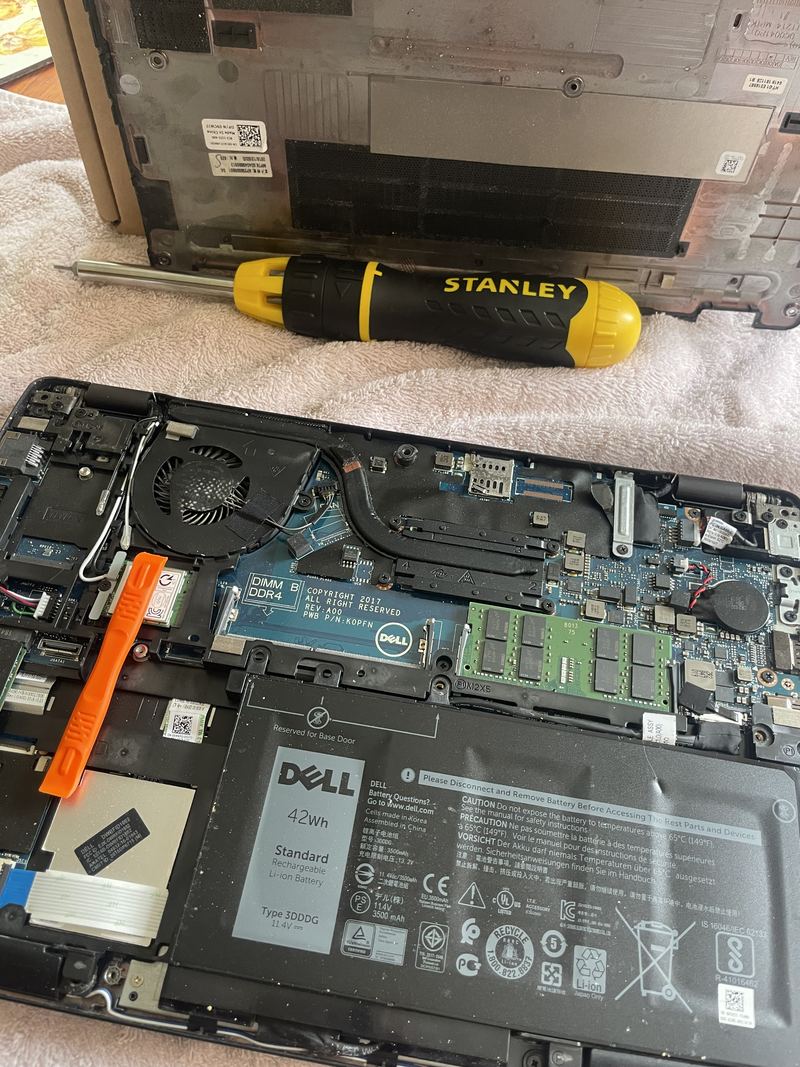
- Replacing a laptop battery: a Dell Latitude 5290, start to finish What a laptop battery replacement actually involves, photographed as it was done on a Dell Latitude 5290: the base off, the old cell out, a new cell in from its anti-static bag, and what to check before the machine goes back into use.
- Laptop hot and loud? What the fan is telling you, and what to do about it A laptop that runs hot and roars is usually choked with dust or running on tired thermal paste, not dying. How to tell the four causes apart from the outside, the one case where you should stop using it, and what a proper clean involves.
- After your repair: keeping the machine right What a repair does and does not do, what settling in looks like in the first week, and the small habits that keep a machine going: heat, dust, batteries, chargers and backups.
Related repairs
You might also need
Laptop repair
Dead, crashing, overheating, or refusing to charge? We find the real fault and quote you a fixed price before any work starts.
Mac repair
MacBook, iMac or Mac mini that will not boot, will not hold charge, or beachballs at everything? A free first opinion by message, a £50 call-out agreed before we travel, then a fixed quote before any work starts.
Computer upgrades and speed-ups
An SSD, more memory, and a proper clean-up can make an old machine feel new. We measure what is actually holding yours back before you spend anything on parts.
Slow computer speed-up
Takes an age to start, spinning wheel at everything, freezing up? We measure what is actually slowing it, then say what a fix will really achieve, before any work starts.
Tell us what is wrong.
Book a repair and describe the fault. A visit has a £50 call-out, agreed before we travel. We will find the fault properly, give you a fixed quote before any work, and if we cannot fix it there is nothing to pay for the repair. A real person who does the work, not a call centre.