Speed, upgrades and upkeep
A slow computer is usually fixable, and rarely by buying more software.
These guides explain what speeds a machine up, such as moving from an old hard drive to an SSD, what a hot and loud fan is telling you, how a laptop battery is replaced from start to finish, how to check a battery's health on a laptop or a phone, and how to keep a machine right once it has been fixed. They are written so you can decide what is worth doing yourself and what is worth paying someone for.
The guides
12 guides on this, newest first.
-
How to check battery health on a laptop, an iPhone or an Android phone
Where Windows, macOS, iPhone, Pixel and Samsung show battery health, what the figures mean, the 80 per cent mark the makers use, and when to replace one.
-
Genuine, compatible or used parts: what each means for your phone or laptop repair
What genuine, compatible and used parts mean for a phone or laptop repair, what an iPhone records afterwards, and what to ask before you agree a quote.
-
Windows 10 is no longer supported: your options, in plain English
Windows 10 lost Microsoft support in October 2025. What that means, the security updates now running to October 2027, and the real options for your PC.
-
Laptop hot and loud? What the fan is telling you, and what to do about it
A laptop that runs hot and roars is usually choked with dust or running on tired thermal paste, not dying. How to tell the four causes apart from the outside, the one case where you should stop using it, and what a proper clean involves.
-
Phone will not charge? The five causes, cheapest first
A phone that will not charge is one of five things, and the cheap ones are the common ones: the cable, the plug, lint in the port, the port itself, or the battery. How to work through them in order at home, what each one looks like, and when it stops being a job for a toothpick.
-
Setting up a new laptop and moving your files across, without losing anything
A new laptop is exciting until you realise everything you need is still on the old one. The order to do things in, what to move and what to leave, the accounts that trip people up, the clutter worth removing on day one, and why the old machine should stay switched on until you have checked.
-
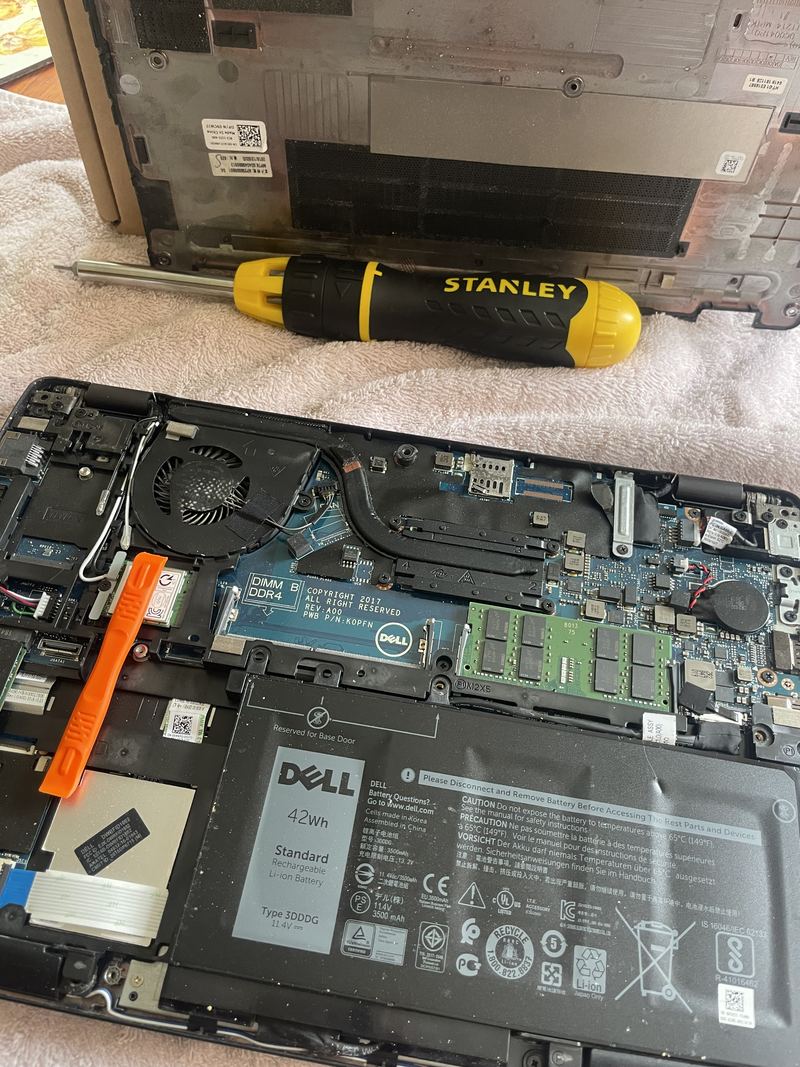
Replacing a laptop battery: a Dell Latitude 5290, start to finish
What a laptop battery replacement actually involves, photographed as it was done on a Dell Latitude 5290: the base off, the old cell out, a new cell in from its anti-static bag, and what to check before the machine goes back into use.
-
After your repair: keeping the machine right
What a repair does and does not do, what settling in looks like in the first week, and the small habits that keep a machine going: heat, dust, batteries, chargers and backups.
-
Slow computer? What actually speeds it up, and what does not
Why a computer feels slow, the free things worth trying first, the one upgrade that genuinely transforms an old machine, and the myths that change nothing.
-
Is it worth repairing my laptop, or should I buy a new one?
The honest framework we use: how the age of the machine, the kind of fault, and its worth to you after the repair decide fix or replace.
-
The warning signs your hard drive is failing, and what to do about it
Strange noises, sudden slowdowns, files that vanish: the early warnings of a failing hard drive, the first thing to do, and the mistakes that make it worse.
-
SSD vs HDD in plain English: the one upgrade that makes an old computer feel new
What a hard drive and an SSD actually are, why the old spinning drive is usually why a computer feels slow, and when the upgrade is worth it.

Get it fixed
When reading is not enough.
Repairs
- Slow computer speed-upTakes an age to start, spinning wheel at everything, freezing up? We measure what is actually slowing it, then say what a fix will really achieve, before any work starts.
- Computer upgradesAn SSD, more memory, and a proper clean-up can make an old machine feel new. We measure what is actually holding yours back before you spend anything on parts.
- Laptop battery replacementDies before lunch, drops from half to nothing, or only works on the charger? We confirm it is the battery and not the charger or the port, then fit the correct cell for your model at a fixed quote.
Common problems
Every topic
Reading is free. So is a first opinion.
Tell us the fault and you get a first opinion, free: what it sounds like, whether it is worth doing, and what it is likely to cost. A photo of the screen or the machine helps. A visit has a £50 call-out, agreed before we travel, which is the first £50 of the job rather than an extra on top. You get one fixed quote, agreed in writing, before any work starts. If we cannot fix the fault we quoted for, you pay nothing for the repair. No Fix, No Fee covers the repair, not the call-out.